# Coding with Karthik: Stay in control of the news with an RSS email feed reader
Date: 2024-06-24
Tags: Programming, RSS
{:.light}
{:.dark}
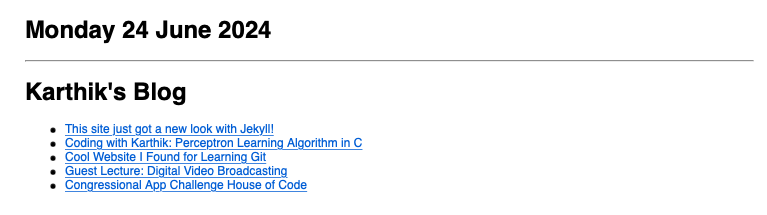
Sample email RSS feed reader
### Intro
So you want to keep up with the news. You _could_ go to cnn.com or read the newspaper, but let's be honest: those sites do not cover (at least to a great depth) some topics we want to read about -- like cooking or technology. It is of course tempting to rather watch Instagram Reels or TikTok -- those algorithms find almost *exactly* what you want -- but you always run the risk of finding yourself doom scrolling for hours at a time (we've all been there :D )!
**Really Simple Syndication** or **RSS** is a web feed that different websites export their content for people to easily integrate it into their news aggregator. Most blogs and news sites publish an RSS feed (you can often find them at the `feed` section such as [https://karthikvedula.com/feed](https://karthikvedula.com/feed)). This allows you to get updates from all kinds of websites -- from major news sites to personal blogs -- all while putting **yourself** in control!

Look out for this RSS feed logo on websites!
There are a plethora of [RSS reader apps](https://www.reddit.com/r/rss/comments/16yo2p5/your_favorite_rss_reader/), which are available in all kinds of forms (commercial services to self-hosted options to mobile apps). Email clients like [Thunderbird](https://www.thunderbird.net/en-US/) also provide updates from RSS feeds as well. However, I wanted a very specific kind of RSS reader -- one that is free, self-hostable, and (most importantly) can be accessed from all your devices.
I couldn't seem to find any app/tool that did all of this, so I wrote one! Every day at 5:30am, this tool sends me an email with content from all the feeds I follow, which I can access from all my devices. There are three parts to this tool:
1. RSS to html converter
2. Terminal email client
3. Cron-job script
### RSS to html converter
The python script below uses the [`feedparser` library](https://pypi.org/project/feedparser/) (run `pip install feedparser` in your terminal) to retrieve content from RSS feeds and write it to a html file. It uses a `template.html` file and replaces the `` comment in it (feel free to write your own template). Here is the code:
```python
import feedparser
from datetime import date
import time
t1 = time.mktime(time.localtime())
html_snippet = ""
### Date ###
html_snippet += f"{date.today().strftime('%A %d %B %Y')}
\n"
feeds = [
#### ADD YOUR FEEDS HERE ####
]
for feed in feeds:
f = feedparser.parse(feed)
if len(f['entries']) == 0:
continue
html_snippet += f"{f.feed.title}
\n"
for e in f['entries']:
t2 = time.mktime(e.published_parsed) # make sure there are no old content in the html
if (t1 - t2) / 3600 > 24:
continue
html_snippet += f"- {e.title}
\n"
html_snippet += "
"
### Output ##
with open("./template.html", "r") as infile:
with open("./page.html", "w") as outfile:
html = infile.read()
out = html.replace("", html_snippet)
outfile.write(out)
```
Here is a sample `template.html`:
```html
Article Links
```
### Terminal email client
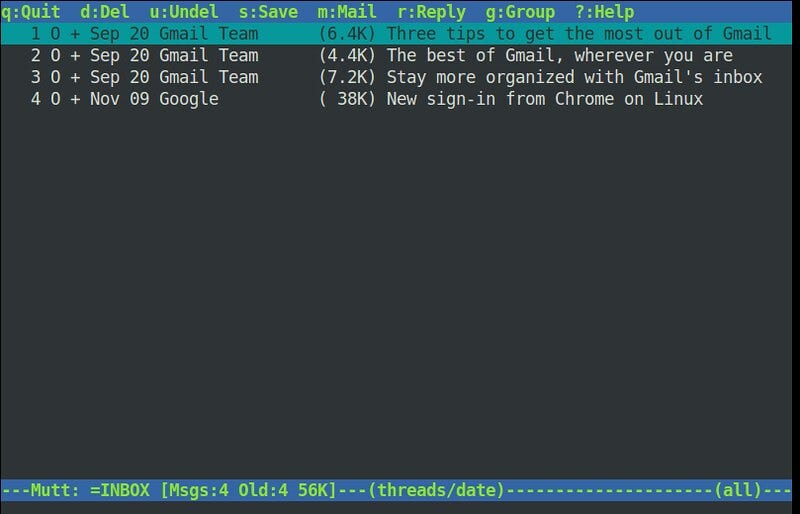
Install a terminal email client for you to be able to send emails in a shell script. I personally used the [Mutt email client](http://www.mutt.org/). Here is a great [guide](https://mritunjaysharma394.medium.com/how-to-set-up-mutt-text-based-mail-client-with-gmail-993ae40b0003) I used for installing Mutt.
{: width="550"}
Mutt does have a graphical user interface, though we will be using the command line interface for this project. Image source
### Cron-job script
Now that we have both
1. script that generates an html file that can be emailed and
2. a tool that can send emails,
all we need to do is program the computer to run the two tools at a certain time periodically. Here is the shell script `send.sh` that runs html converter and then the email tool.
Replace the fields with your information in the script. Don't forget to run `chmod +x ./send.sh` to enable the script to be run!
```bash
DATE=$(date);
cd [**DIRECTORY YOUR SCRIPTS ARE**]
[**PATH TO PYTHON**] rss_to_html.py; # html tool
mutt -e "set content_type=text/html" [**YOUR EMAIL**] -s "Today's News -- $DATE" < [**PATH TO DIRECTORY**]/page.html # send email
```
Now we need this above shell script to run periodically at a certain time. If you are on Linux/Mac you have a utility called **cron** which can be used to schedule commands. Run `crontab -e` if on Linux, and add the following line:
```bash
# m h dom mon dow command
30 5 * * * [PATH TO SCRIPT]/send.sh
```
This signifies that the `send.sh` script should run at 5:30am every day (learn more about configuring cron-jobs [here](https://ostechnix.com/a-beginners-guide-to-cron-jobs/)).
I currently have this all running on a Raspberry Pi home server. If you did everything I said, you should be all set!
### Why RSS matters
Now that you may have become an RSS fanatic, I have one more thing to say:
Not only does using RSS feeds help organize your own news content, it also supports bloggers like me. Personal blogs can have very valuable, engaging information, but often have difficulty reaching people who want to read them, as other mainstream & popular content often eclipse small blogs. Subscribing to an RSS allows personal blogs to have regular readers, which is very rewarding to us bloggers!
Feel free to add my feed: [https://karthikvedula.com/feed](https://karthikvedula.com/feed) to your RSS reader!
Enjoy!